

 HOME
HOME PRODUCT CENTER
 ABOUT US
 DOWNLOAD CENTER
 SUPPORT CENTER
 SUBSCRIBE
 BLOG
BLOGHow to Choose a Digital Printer for a Commercial Print Shop
Choosing a digital printer for a commercial print shop is not simply about finding the fastest machine or the lowest purchase price. The right printer needs to match your production volume, application mix, media types, quality requirements, workflow, and long-term operating costs.
For a growing print business, the best equipment is the one that can produce consistent results efficiently while fitting into your existing workflow and supporting future expansion. MTuTech’s portfolio covers multiple digital printing technologies and applications, including UV, Single Pass, DTF, DTG, direct-to-fabric, dye sublimation, and eco-solvent printing.
This guide explains how to choose digital printer for print shop operations and what to evaluate before making a commercial printing equipment investment.
1. Start With Your Print Shop’s Production Requirements
Before comparing printer specifications, define exactly what your business needs to produce.
Ask yourself:
· What products do you print most frequently?
· What is your average daily and monthly production volume?
· What are your typical order sizes?
· Do you primarily handle short-run customized jobs or long production runs?
· Are you planning to expand into new applications?
Production volume is one of the most important factors because a printer designed for occasional or short-run production may not be appropriate for a commercial shop handling continuous orders.
Short-Run vs. High-Volume Production
Short-run businesses generally benefit from flexible equipment that can switch between jobs quickly. Custom signage, promotional products, personalized merchandise, and small-batch graphics often require versatility rather than maximum throughput.
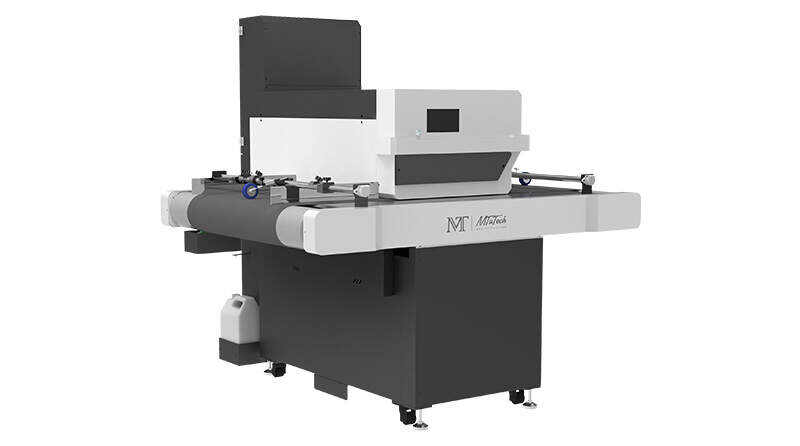
High-volume operations need a different approach. Production-oriented systems should be evaluated for continuous operation, print speed, media handling, and overall workflow efficiency. For businesses where production speed is a major priority, Single Pass Printers are designed for high-speed digital printing applications.
A useful rule is simple: choose equipment based on your real production demand, not the maximum specification on a brochure.
2. Match the Printer Technology to Your Applications
The next step is choosing the printing technology that fits your products.
Different commercial print jobs may require very different approaches.
Printing Requirement | Suitable Printer Type | Typical Applications |
Rigid substrates | UV Flatbed Printer | Acrylic, wood, glass, metal, plastic, signage |
Flexible graphics | Roll-to-Roll UV / Eco-Solvent | Banners, vinyl, vehicle graphics, displays |
Packaging production | Single Pass Printer | Boxes, paper bags, labels, cards |
Apparel and fabric | DTF / DTG / Direct-to-Fabric | T-shirts, sportswear, fashion, textiles |
Polyester-based textile work | Dye Sublimation Printer | Flags, soft signage, apparel, décor |
Promotional products | UV Printer / UV DTF | Gifts, phone cases, customized objects |
When evaluating production equipment, it is useful to review Single Pass Printer Applications and compare the supported applications with the products your print shop currently manufactures or plans to add.
This is why there is no single “best” digital printer for every print shop. The best choice depends on the products you actually sell, the materials you use, and the production volumes you expect.
3. Compare the Features That Affect Print Quality and Productivity
After identifying the right technology, compare individual printer specifications.
Print Resolution and Image Quality
Resolution affects detail, text reproduction, gradients, and fine graphics. However, higher DPI alone does not guarantee better commercial output.
Also evaluate:
· Printhead technology
· Ink droplet control
· Color configuration
· Color consistency
· Multi-pass or single-pass operation
· Software and RIP capabilities
Before purchasing, request actual production samples using the media and artwork you normally sell. A printer that performs well with a simple test image may behave differently with fine text, gradients, large solid colors, or detailed graphics.
Production Speed
Advertised speed should always be interpreted in context.
A printer’s real productivity can be affected by:
· Resolution mode
· Number of passes
· Media loading
· Drying or curing
· Operator intervention
· Cleaning cycles
· Job changeover time
· Finishing requirements
A slightly slower printer can sometimes be more profitable if it produces fewer rejects and requires less operator intervention.
4. Evaluate Media Compatibility Before Buying
One of the most common mistakes when purchasing a commercial printer is focusing on the machine before confirming the materials it needs to handle.
Create a list of your current and planned media:
· Paper and cardboard
· Vinyl
· Banner materials
· Acrylic
· Wood
· Glass
· Metal
· Plastic
· Cotton textiles
· Polyester fabrics
· Blended fabrics
Then verify whether the printer supports those materials directly and whether additional pretreatment, coating, curing, transfer, or finishing equipment is required.
A printer’s media compatibility can directly influence the range of products your shop is able to offer.
Media Compatibility Checklist
Question | Why It Matters |
What is the maximum media size? | Determines the largest products you can produce |
What media thickness can be handled? | Important for rigid substrates |
Roll or sheet feeding? | Affects workflow and productivity |
Direct or transfer printing? | Changes the production process |
Can multiple materials be supported? | Helps diversify your product range |
Are special coatings or pretreatment required? | Adds labor and operating costs |
Before selecting a final machine, compare these requirements against the product information available in MTuTech’s Product Center.
5. Calculate the Total Cost of Ownership
The purchase price is only one part of the investment.
When comparing printers, calculate the total cost of ownership (TCO) over the expected operating period.
Include:
· Printer purchase price
· Ink consumption
· Media consumption
· Printhead replacement
· Cleaning supplies
· Preventive maintenance
· Electricity
· Operator labor
· Software or RIP costs
· Repairs and spare parts
· Downtime
· Financing costs
A lower-priced printer can become more expensive if it consumes more ink, requires frequent maintenance, or causes significant downtime.
A simple way to compare equipment is:
Cost per Job = Ink + Media + Labor + Maintenance + Energy + Allocated Equipment Cost
The exact calculation will vary by business, but the principle is important: compare operating economics, not just machine prices.
6. Examine Workflow and Ease of Operation
Commercial printing is a workflow business. A printer that produces beautiful output but slows down your operators can reduce overall profitability.
Look at the complete production process:
Artwork → RIP → Media Loading → Printing → Curing/Drying → Finishing → Quality Control → Delivery
Consider whether the printer can integrate smoothly with your existing workflow.
Important questions include:
· Is the RIP software easy to use?
· Can multiple jobs be queued efficiently?
· Can operators monitor ink and machine status?
· How easy is media loading?
· How quickly can jobs be changed?
· Does the system provide automated maintenance functions?
· Can the printer support unattended production?
Workflow efficiency becomes increasingly important as order volume grows. Even small delays repeated hundreds of times each month can create significant lost capacity.
7. Check Maintenance, Reliability, and Technical Support
A production printer is an operational asset, so reliability should be evaluated alongside print quality.
Before buying, ask about:
· Routine maintenance requirements
· Printhead cleaning procedures
· Ink circulation or management systems
· Spare parts availability
· Warranty coverage
· Remote technical support
· On-site service
· Operator training
· Response times for technical issues
Technical documentation should also be part of your evaluation process. MTuTech’s Download Center provides access to product-related materials and technical resources that can help buyers understand equipment specifications and requirements before making a purchase decision.
Service Questions to Ask Before Purchase
1. Who will support the machine after installation?
2. How are technical problems handled remotely?
3. Are replacement parts readily available?
4. Is operator training included?
5. What maintenance tasks must staff perform daily or weekly?
A reliable service structure can be just as important as the printer itself.
8. Choose a Printer That Can Grow With Your Business
Your printer should solve today’s problems without creating tomorrow’s limitations.
Look beyond your current production volume and consider where your print shop could be in two or three years.
For example, a growing business may need:
· Wider print formats
· Higher production speeds
· More color channels
· Automation
· Additional media compatibility
· Multi-shift operation
· Higher monthly duty cycles
A scalable printer can help you avoid replacing equipment too early.
At the same time, avoid paying for capabilities you are unlikely to use. The goal is not to buy the biggest machine available; it is to buy the right level of production capacity.
Step-by-Step Guide: How to Choose the Right Digital Printer
Follow this process before requesting a final quotation.
Step 1: Define Your Product Mix
List the products that generate the majority of your sales and identify the materials used for each one.
Step 2: Calculate Production Volume
Record average and peak daily output. Base your printer capacity on realistic production demand rather than occasional peak orders.
Step 3: Select the Printing Technology
Choose between UV, Single Pass, DTF, DTG, direct-to-fabric, dye sublimation, eco-solvent, or another technology according to your applications.
Step 4: Compare Critical Specifications
Evaluate print width, speed, resolution, printhead configuration, ink system, media compatibility, and automation.
Step 5: Calculate Total Operating Costs
Estimate ink, media, maintenance, labor, energy, software, and potential downtime.
Step 6: Test Real Production Samples
Print your actual artwork on your actual materials whenever possible. Test both quality and production workflow.
Step 7: Evaluate Support and Training
Confirm warranty, technical support, installation, training, spare parts, and maintenance procedures.
Step 8: Consider Future Growth
Ask whether the printer can support increased volumes or new product categories without forcing another major investment.
Final Comparison: What Matters Most?
Buying Factor | Lower Priority | Higher Priority |
Purchase price | Comparing initial investment only | Evaluating complete TCO |
Print speed | Occasional production | Daily commercial production |
Resolution | Basic graphics | Detailed professional output |
Media compatibility | One primary material | Multiple product categories |
Automation | Mostly manual workflow | Continuous production |
Maintenance | Infrequent use | Daily or multi-shift use |
Technical support | Experienced in-house team | Limited technical staff |
Scalability | Stable business model | Rapidly growing print shop |
Conclusion
Learning how to choose digital printer for print shop operations starts with your business requirements—not with a particular printer model.
Define your applications, production volume, media, quality expectations, workflow, operating costs, and future growth plans first. Then compare printer technologies and individual models based on how well they solve those requirements.
The right investment should deliver more than impressive specifications. It should help your print shop improve productivity, maintain consistent output, control operating costs, and expand into new profitable applications.
Ready to take the next step? Explore MTuTech's Product Center to compare digital printing technologies and equipment for different commercial applications.