

 HOME
 PRODUCT CENTER
 ABOUT US
 DOWNLOAD CENTER
 SUPPORT CENTER
 SUBSCRIBE
 BLOG
Estimating the real output of a flatbed UV printer requires more than checking its advertised printing speed. Actual production depends on print settings, substrate size, loading and unloading time, positioning, inspection, and rejected prints.
For manufacturers and commercial print shops, an accurate output estimate helps determine whether a machine can meet daily order volumes, calculate production costs, and compare equipment options before purchasing.
Rated Printing Speed vs. Real Production Output
Rated printing speed describes the printer's performance under specified operating conditions. Real production output measures how much acceptable work the machine completes within a defined period, including the time required to prepare and handle each job.
These figures can differ significantly because a production cycle includes several activities beyond printing.
For example, MTuTech lists the MT-UV 9060Pro flatbed UV printer with a maximum rated speed of 15 m²/h, while the MT-UV 2513Pro is listed at up to 80 m²/h. These are published specifications, not guaranteed finished-product output rates.
Calculate the Complete Production Cycle
A production cycle includes all the activities needed to complete a batch. Measuring these stages provides a more useful estimate than timing the printhead movement alone.
A practical batch cycle can be expressed as:
Batch cycle time = Setup time + Loading and positioning time + Printing time + Unloading and inspection time
Setup time includes selecting the correct file, configuring print settings, preparing fixtures, and confirming the first piece. For repeat orders, some setup activities may be shorter than for a new job.
Loading and positioning time depends on the number of items, their geometry, and whether operators use manual alignment, fixtures, or a compatible based positioning system.
Printing time depends on the total printed area, print mode, number of passes, and ink-layer requirements. Unloading and inspection time includes removing finished parts, checking quality, and preparing the next batch.
Record each stage separately during a representative production run. This makes it easier to identify bottlenecks and determine whether a faster printer would actually improve total output.
Estimate Output Using Batch Time and Reject Rate
For piece-based production, the simplest useful calculation is:
Good units per hour = Good units per batch ÷ Batch cycle time in hours
Good units per batch should account for rejected products. If a batch contains 100 pieces and 4% fail inspection, the expected acceptable output is approximately 96 pieces.
Consider this illustrative example:
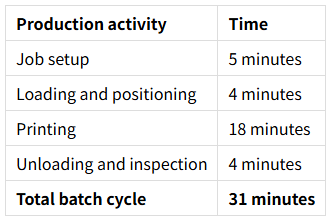
Assume the batch contains 20 panels and the observed reject rate is 5%.
Expected good units per batch:
20 × (1 − 0.05) = 19 panels
Estimated good output:
19 ÷ 31 × 60 = approximately 36.8 good panels per hour.
For more reliable planning, measure several consecutive batches. The first batch may take longer because it includes initial setup, but the subsequent batches can benefit from established settings and prepared fixtures.
Estimate Area Output for Different Panel Sizes
Area-based output is useful when comparing machines that print rigid sheets, signage, display panels, or furniture components of different sizes.
The basic calculation is:
Good printed area per hour = Total acceptable printed area ÷ Total production time in hours
For example, if a production run completes 24 acceptable panels, each with a printed area of 0.5 m², in two hours, the average acceptable output is:
24 × 0.5 ÷ 2 = 6 m²/h.
This calculation uses the actual printed area rather than the entire printer bed. Unprinted margins, gaps between panels, and unused bed space should not be counted as productive printed area.
For mixed-product orders, calculate output separately for each product type or convert all finished pieces into a consistent production measure. This prevents a batch of small promotional items from appearing directly comparable to a batch of large panels simply because both used the same machine for one hour.
Account for Print Settings and Substrate Layout
Print settings and substrate layout determine how efficiently the available bed area is used.
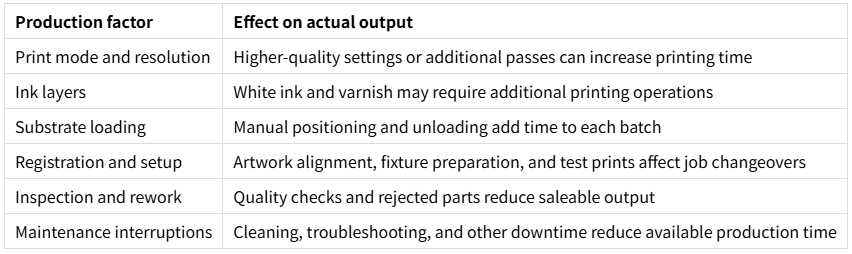
Higher resolution, slower print modes, multiple passes, and additional white ink or varnish layers can increase cycle time. The effect varies by printer configuration and artwork, so use actual test-job timings rather than applying a universal multiplier.
Batch layout also matters. Placing multiple items in one run can reduce repeated loading and setup time, but only when the items can be positioned reliably and the layout suits the printing requirements.
Before finalizing a production estimate, confirm:
· The actual printed dimensions of each item.
· The number of pieces that fit within the usable bed area.
· The required print mode and number of passes.
· Whether white ink or varnish adds printing operations.
· The time needed for alignment, loading, unloading, and inspection.
· Whether different products require separate files or setup changes.
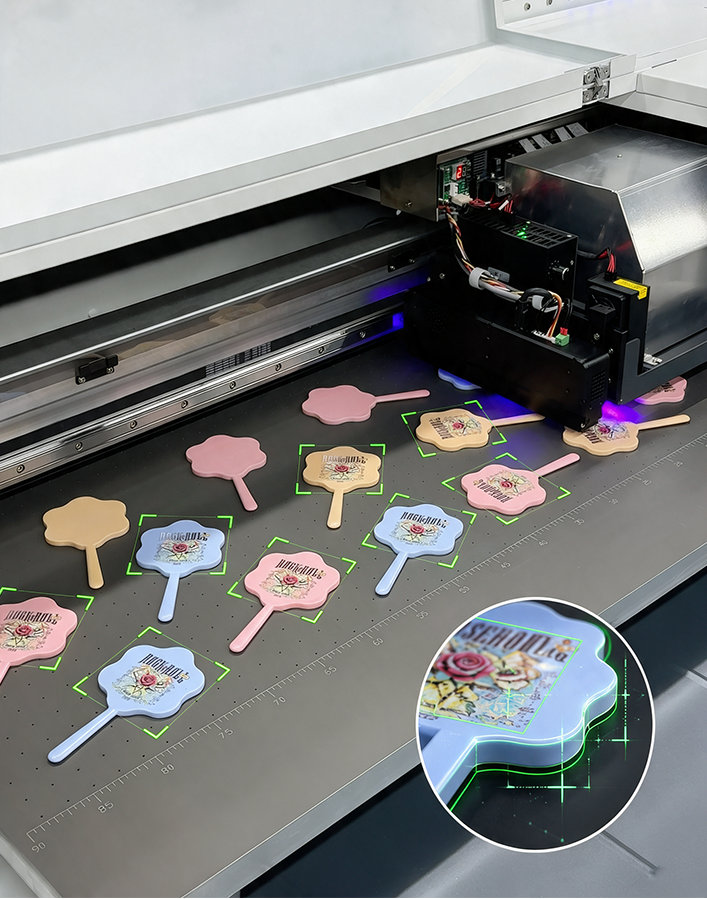
A compatible visual positioning system may help reduce manual alignment for irregular products. However, the actual time savings should be verified through a production trial.
Compare Printer Capacity Against Your Order Requirements
Machine selection should be based on the work the business needs to produce, not just the largest advertised speed.
For example, a compact printer may be suitable for small promotional products and frequent short runs, while a large-format machine may be more practical for wide rigid panels or larger batch layouts.
MTuTech's MT-UV 2513Pro large-format flatbed UV printer has a published print area of 2500 × 1300 mm and a rated speed of up to 80 m²/h. Its larger bed may accommodate wider panels or more items per batch, but the actual output advantage depends on the job layout, print settings, and handling process.
To compare equipment fairly, prepare the same representative job for each proposed model. Use identical artwork, material, print-quality requirements, and acceptance criteria wherever the configurations allow.
Measure the complete batch cycle and calculate acceptable units per hour. Then compare the result with the required daily output and available production hours.
Validate the Estimate with a Production Trial
A production trial turns theoretical assumptions into practical planning data. It should use representative materials, normal operating settings, and the actual workflow expected after installation.
Record the following information:
· Total setup and changeover time.
· Loading, positioning, and unloading time.
· Printing time under the intended print mode.
· Number of pieces started and completed.
· Number of accepted and rejected pieces.
· Downtime or rework during the trial.
Repeat the trial across several batches and, where relevant, different product types. Calculate the average good output and identify the stages responsible for most delays.
Use the resulting figures to plan shift capacity, estimate labor requirements, and calculate production cost per acceptable piece. If the measured output falls below the target, investigate the main bottleneck before assuming that a faster machine is the only solution.
A reliable capacity estimate should reflect the complete production process, with sufficient allowance for normal variation and the quality requirements of the finished product.