

 HOME
 PRODUCT CENTER
 ABOUT US
 DOWNLOAD CENTER
 SUPPORT CENTER
 SUBSCRIBE
 BLOG
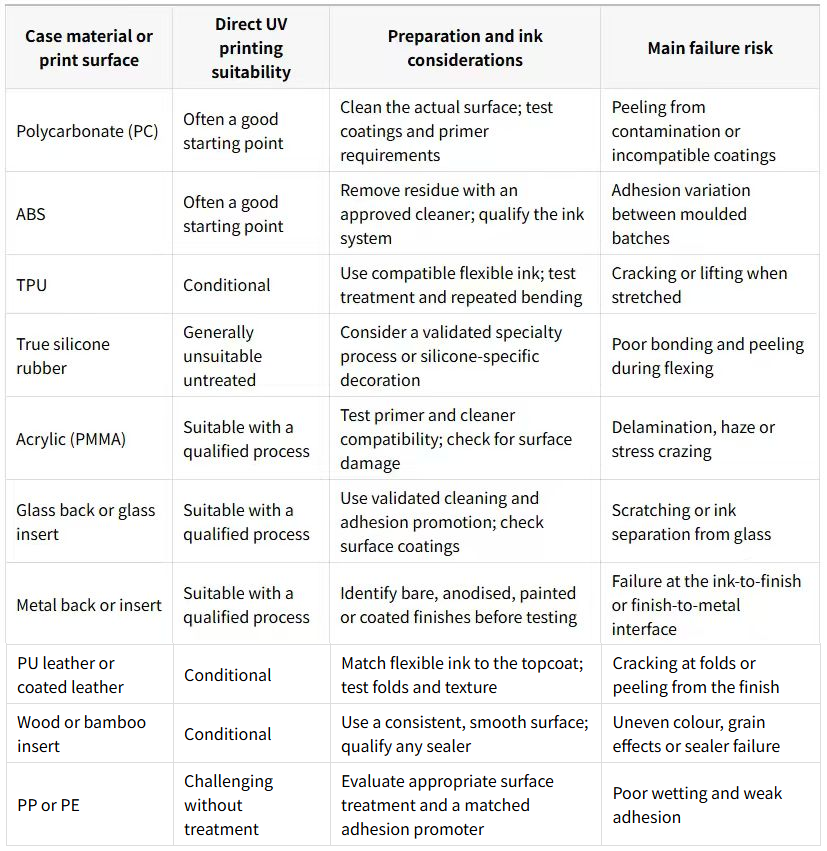
PC, ABS, acrylic and suitably prepared glass or metal phone case surfaces can be UV printed. TPU and PU leather can also be candidates when the ink and surface treatment suit their flexibility. Untreated silicone is generally unsuitable for standard direct UV inkjet printing, while PP and PE require more demanding surface preparation and qualification.
The deciding factor is the surface receiving the ink. A case sold as “silicone” may actually be TPU, and a hybrid case may combine a rigid PC back with a soft bumper. Coatings, mould-release residue and surface texture can change adhesion even when the underlying polymer is identical.
For customisation businesses, choosing the right blank reduces peeling, cracked graphics and rejected orders. This guide compares common materials and explains how to qualify a case before committing to production.
Which Phone Case Materials Are Suitable for UV Printing?
UV-printable phone case materials are substrates that accept a cured UV ink film with sufficient adhesion and flexibility for the intended use.
A successful sample must do more than look sharp immediately after printing. The decoration should withstand handling, installation and removal, and the cleaning conditions agreed with the customer. The following comparison is a starting point for testing, rather than a guarantee for every material grade.
Rigid PC and ABS Cases
A flat, rigid back is a practical starting point because the print area stays relatively stable during handling. However, a soft-touch coating changes the printing surface: the ink bonds to that coating rather than directly to the PC or ABS beneath it.
Ask the blank supplier for both the base resin and the outer finish. Two cases made from the same polymer may require different preparation if one has a protective coating, textured finish or residual mould-release agent.
Flexible TPU and Hybrid Cases
TPU needs an ink film capable of accommodating the deformation experienced in use. A rigid ink layer may adhere at first but crack when the case is pulled over a phone. Flexible ink compatibility must be confirmed for the specific printer and case, including white ink and varnish layers.
On a PC-and-TPU hybrid case, printing only the rigid back can simplify qualification. Keep artwork away from highly flexible corners unless testing demonstrates that the complete ink stack survives installation and removal.
Silicone Cases Require a Different Decision
True silicone should not be treated as another printable plastic. Its surface chemistry makes reliable bonding with standard UV ink difficult, and its flexibility adds further stress. Inkcups’ technical explanation of printing on silicone distinguishes silicone-specific inks from conventional UV-curable inks.
For genuine silicone blanks, ask for a demonstrated process on the exact part. A specialty coating or alternative decoration method may be necessary. Applying an ordinary UV primer or transfer does not automatically solve the problem.
How Do You Prepare and Test Phone Cases for UV Printing?
Phone case preparation and testing establish whether the surface, pretreatment, ink and curing conditions work together under realistic handling.
Identify and Clean the Actual Print Surface
Obtain the material grade, finish and any factory treatment from the supplier. Check for mould-release agents, oils, dust and protective films.
Use only a cleaner approved for the case and coating. Test it on a spare blank before production because some solvents can haze, soften or damage plastics.
Mimaki’s UV ink adhesion troubleshooting guidance explains that curing alone does not ensure bonding and describes cleaning and pretreatment options for different substrates. Surface preparation must therefore be specified alongside the printer settings.
Qualify Primer and Curing Conditions
Primer selection is specific to the substrate and ink chemistry. More primer is not necessarily better: an uneven or incompatible layer can affect clarity, texture and bonding. Plasma or corona treatment may help certain difficult plastics, but its effectiveness and usable treatment window need verification.
For a concrete example, the Nazdar 7040 adhesion promoter technical data sheet specifies approximately 10 minutes for drying, depending on humidity, and recommends 24 hours at room temperature for post-curing of the printed surface for best adhesion.
These timings apply to that product’s specified process. They are not universal settings for all UV primers or MTuTech inks.
Use the ink supplier’s approved curing conditions. Increasing UV exposure cannot compensate for an incompatible surface, and excessive ink build can make flexible decorations harder to qualify.
Check Adhesion, Flexibility and Wear
Agree on acceptance criteria before approving a production sample. Evaluate adhesion using a documented method suitable for the case geometry and coating. Then test rubbing, scratching, installation and removal, and exposure to the customer’s intended cleaning products.
For TPU, include repeated bending at the printed region. For glass or metal inserts, inspect edges and corners where lifting may start. For clear cases, evaluate haze, primer marks and appearance from both sides.
Record the blank supplier and batch, cleaner, treatment, ink configuration, print mode, curing settings and conditioning time before testing. Requalify when the resin, coating or supplier changes. A passing sample from one batch does not establish compatibility for every future delivery.
How Do You Choose a UV Printer for Phone Case Production?
A suitable phone case UV printer matches the required print area, case geometry, ink configuration, positioning method and verified production workflow.
Match Print Area to Your Production Needs
Start by reviewing MTuTech’s small-format UV flatbed printer range. Its published specifications include a 420 × 297 mm print area for the MT-UV A3MAX Pro and 900 × 600 mm for MT-UV 9060 configurations.
Bed size affects how many cases can be arranged per batch, but usable capacity also depends on fixtures, spacing and access for loading. A larger bed is most useful when the preparation and handling workflow can keep pace with printing.
Evaluate White Ink, Varnish and Case Geometry
White ink is useful beneath colour on dark or transparent cases, while varnish can add selected visual effects. Each added layer changes the print stack and must be included in durability testing. White ink is an opacity layer, not a substitute for an adhesion promoter.
Camera bumps, raised rims and curved edges affect head clearance and image quality. A fixture should hold each case consistently without forcing a flexible case into a shape it will not retain.
Maximum object height is not the same as the acceptable printing gap over a recessed surface. Ask the supplier to demonstrate the actual print area on your case, particularly near raised edges and camera openings.
Compare Finished Output Rather Than Maximum Speed
Compare equipment through the MTuTech product centre using the complete job: cleaning, any treatment, loading, white and colour printing, finishing, unloading and inspection.
Ask for output in accepted cases per hour using your artwork and quality settings. A maximum square-metres-per-hour figure alone does not describe finished phone case productivity.
Direct UV printing deposits ink onto the case. UV DTF prints a transferable decoration onto film first. Transfer printing changes the application method, but the adhesive still needs to bond to the case and survive flexing. It should not be assumed to make untreated silicone or every soft-touch finish compatible.
Conclusion
The best phone case material for UV printing is one whose actual surface accepts the selected ink system and passes the required durability tests.
PC and ABS hard backs are sensible starting points. TPU needs a compatible flexible ink system, while acrylic, glass, metal, leather and wood require attention to their surface finish and preparation. True silicone, PP and PE deserve additional process evaluation before commercial commitments.
For an equipment recommendation, contact MTuTech about your phone case printing application with sample blanks, material and coating details, artwork, intended daily volume and durability requirements. Request a sample print and a review of ink compatibility, pretreatment and fixture requirements before selecting the final configuration.
FAQ
Can You UV Print Directly on TPU Phone Cases?
Yes, some TPU cases can be printed with compatible flexible UV inks and suitable preparation. Test the complete decoration during bending, installation and removal. A good-looking flat sample does not establish long-term flexibility.
Can a Standard UV Printer Print on Silicone Phone Cases?
Untreated true silicone is generally unsuitable for standard direct UV inks. Confirm whether the blank is silicone or TPU, then obtain evidence for a specialty process or consider silicone-specific pad or screen printing.
Which Phone Case Material Is Easiest to Start With?
A smooth, flat PC or ABS hard case without an unknown surface coating is often a practical starting point. Adhesion still depends on the resin grade, contamination, ink chemistry and curing conditions.
Do All Phone Cases Need Primer Before UV Printing?
No. Some surfaces work with cleaning and a compatible ink, while others need an adhesion promoter or treatment. Test the actual blank and follow the ink supplier’s guidance rather than applying one primer to every material.
Can UV Printing Produce Bright Colours on Clear Cases?
Yes. A controlled white underbase can make colours more opaque on transparent cases. Select the layer order for front-side or reverse-side viewing and check alignment, clarity and adhesion on the finished sample.
Will UV-Printed Phone Cases Peel or Crack?
They can if the surface is contaminated, the ink is incompatible, curing is unsuitable or a flexible case stretches beyond the ink film’s capability. Qualify adhesion and realistic wear before production, and repeat testing when blanks or process settings change.